


Self - Credit Builder & Cards
4.738.50K Reviews
App Specs
- Version
- 10.0.0
- Updated On
- License
- Free
- Downloads
- 1,000,000+
- Developer
- Self Financial, Inc.
- Categories
- Finance
- Platform
- Android, iOS
Screenshots


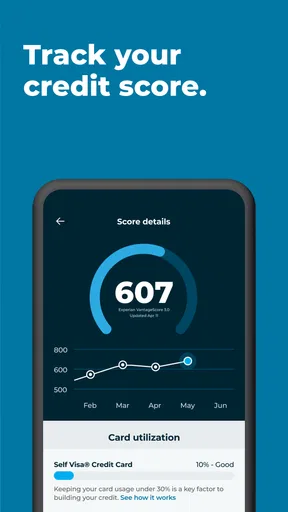
 Analysis by AppCompare
I see Self – Credit Builder & Cash as a focused tool for people who need a structured way to work on their credit, not a shortcut to an overnight score change. Its central idea is to pair regular payments with credit building, while giving users a place to manage the process. That can make a long-term goal feel more concrete, but it also means the app is most useful when its payment plan fits comfortably into your budget.
Who benefits most from a credit-building routine
This finance app is aimed at people who are new to credit, have a thin credit history, or want a more deliberate routine than simply applying for a conventional card. A credit-builder account can give that routine a shape: make payments on schedule, keep track of the account, and treat consistency as the goal. I would consider it for someone who has struggled to qualify for standard credit products, provided they have room in their monthly budget for another commitment.
It is less compelling for someone who already has established credit and can qualify for a low-cost card or loan that suits their needs. In that situation, the extra account may add little value. I would also avoid starting a payment plan just because improving a score sounds appealing. Rent, utilities, existing debts, and emergency savings should come first; a credit-building commitment is only useful if it remains affordable through an ordinary, not especially convenient, month.
What the monthly process asks of you
The important practical question is not just whether payments are reported, but whether you can keep making them on time. Before committing, I’d read the account terms in the app and check the total cost, payment schedule, and how the account works from start to finish. The original experience described a clear breakdown of fees and interest, which is helpful, but clarity does not make a product free of cost. Compare those costs with the value you expect from building payment history.
A useful habit is to choose a payment date that follows a dependable payday, then leave enough room in your checking account for bills that clear around the same time. Autopay can reduce the chance of forgetting, but it is not a substitute for checking balances. I’d still review the upcoming payment before it runs, especially if income varies or another large expense is due. Reminders are useful as a second layer, not as a reason to stop monitoring cash flow.
For example, imagine you are paid every other Friday and tend to handle bills as soon as the deposit arrives. I’d align the credit-builder payment with a payday that leaves room for rent and essentials, then check the app after the payment to confirm the account reflects the activity. This small routine makes the product easier to manage without treating a future credit-score change as guaranteed. Credit progress depends on more than one account, and it generally takes patience.
How it compares with familiar alternatives
Compared with a regular secured credit card, a credit-builder account is less centered on using a card for everyday purchases. That can suit someone who wants a payment-history routine without adding another spending channel. A secured card may be a better fit for a person who can manage purchases, pay attention to utilization, and pay the statement responsibly. The app also offers the Self Visa® Credit Card to eligible people who have opened a credit-builder account, so it can provide a path toward card use, but I would treat that as a separate decision rather than an automatic next step.
Worth Reading Before You Choose

EA SPORTS FC Mobile 26 Is a Bigger Football Game, but It Takes Time

Flipboard Shows What News Apps Must Do Beyond the Feed

Switching to Android Auto Means Rethinking Your Driving Routine

Google Calendar Makes a Crowded Week Easier to Manage

Ludo King Makes the Most of the Minutes Between Plans

Baby Panda World Brings Quick Play to Modern Phones, but Its Game Library Feels Busy
Compared with simply using a free credit-monitoring service, this app is more action-oriented: it is designed around an account and payments, rather than just showing credit information. That distinction matters. Monitoring can help you spot changes, but it does not itself create a payment history. On the other hand, if your main goal is to understand your reports or check for errors, a monitoring service may be the more direct first stop. I would choose the tool based on the problem you are trying to solve, not on the assumption that every credit product improves a score in the same way.
Making the most of the card option
The secured card can be useful for someone who wants to practice predictable, low-stakes card habits after opening a credit-builder account. I’d keep its role narrow: use it for a small planned expense, watch the balance, and avoid treating available credit as extra income. The collateral arrangement is a reason to understand the card’s terms before using it, not a reason to assume that it works like an ordinary unsecured card.
There is also a sensible reason to pause before adding the card. If you already have trouble keeping track of due dates or are carrying expensive debt, another account may make your finances harder to manage. I’d first build a reliable payment routine with existing obligations. The card is most useful when it fills a clear gap in your plan, rather than when it is opened simply because the option appears in the app.
Setting realistic expectations
A credit score is an outcome, not a dial the app can turn on command. I would not use a particular month’s score movement as the sole measure of whether the account is worthwhile. Check for accurate reporting, keep payments on time, and give the process room to work. If you notice information that looks wrong, review the relevant account details and contact the appropriate support channel rather than assuming an app display alone resolves a credit-report issue.
Self is free to download, but the credit-building product itself has terms and costs that deserve attention. I’d distinguish the app’s download price from the financial commitment you may choose inside it. That is especially important if you are comparing it with a basic budgeting tool or a free monitoring service, neither of which asks you to take on the same kind of payment plan. The right comparison is total cost and practical benefit, not simply whether the app costs anything to install.
The app is from Self Financial, Inc. It has an average rating of 4.5 from around 97,000 ratings, with more than a million installs. Those figures suggest that many people have tried it, but I would still judge it by whether its terms, payment schedule, and account options make sense for my own circumstances. Popularity does not replace checking the details before enrolling.
For anyone wondering whether it is suitable for a first-time credit user, I think it can be approachable: the interface is described as intuitive, and the educational material can help make unfamiliar credit concepts easier to follow. Still, learning resources are a companion to the account, not a replacement for reading its terms. Someone who wants to build credit without taking on a recurring payment should consider other ways to establish responsible credit history before deciding this is the right route.
The app is free and rated for Everyone, and its current version is 7.10.0; it was released on March 30, 2018, and requires Android 7.0 or later. Those details make it easy to assess basic compatibility, but the more consequential decision is whether the financial product suits your budget and goals. I would take time to review the in-app terms before opening an account, especially if you are comparing several credit-building options.
One practical tip is to make a quick monthly check-in part of the routine: confirm the payment went through, look over the account activity, and note any change in your budget that could affect next month. This is more dependable than relying on a score notification to tell you whether you are making progress. It also helps catch a payment problem early, when you have a better chance to address it before it disrupts your plan.
Another trade-off is convenience versus flexibility. Automated payments and reminders can reduce mental load, but a fixed commitment may feel restrictive when income is irregular. If your pay fluctuates, I’d first map out the low-income months and make sure the payment still fits. If it does not, a product that allows you to work on budgeting or credit education without a recurring account may be the safer choice for now.
Getting Started with Self
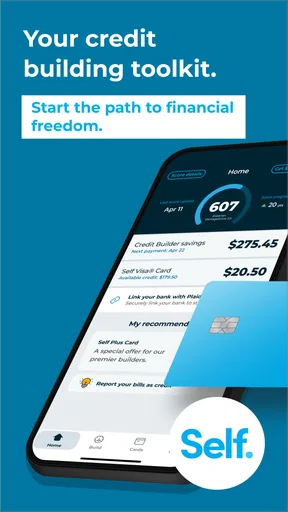
First things first, downloading and setting up Self – Credit Builder & Cash is a breeze. It’s available for both Android and iOS, so no matter your device, you're covered. Once installed, the sign-up process is straightforward. What caught my eye was the app’s clean interface. It’s intuitive, meaning you won’t need a degree in finance to navigate through it. You start by creating an account, and voilà, you're ready to start your credit-building journey.
How Does It Work?
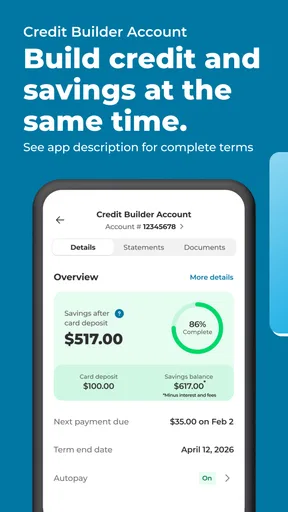
The app offers a unique way to build credit. Essentially, you open a credit-builder account, where you make monthly payments. The best part? These payments are reported to all three major credit bureaus, helping to build your credit history. It feels like a savings plan that also boosts your credit score. There’s something satisfying about watching your credit score inch up every month.
One thing I appreciated is the app’s transparency. You know exactly what you're paying for and where your money is going. It offers a clear breakdown of fees and interest, so there are no nasty surprises lurking around the corner.
Features That Stand Out
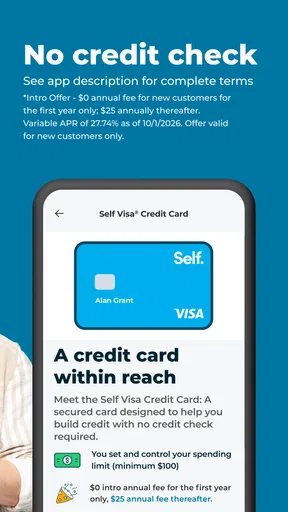
The app isn’t just about the credit-builder account. It packs a few more features that make it a well-rounded financial tool. For instance, the Self Visa® Credit Card is available to those who have opened a credit-builder account. This secured card is a nifty addition to your wallet, allowing you to use your savings as collateral. It’s a great stepping stone to managing a credit card responsibly.
Another feature worth mentioning is the autopay option. I’m all about setting and forgetting, and with autopay, I never have to worry about missing a payment. Plus, the app sends reminders and updates, keeping me on track without being intrusive.
Learning While Building
Education is a big part of what Self offers. The app provides a treasure trove of resources to help you understand credit better. From articles to tips and tricks, it’s like having a personal finance guru in your pocket. I especially loved the bite-sized pieces of advice that popped up every so often, keeping me informed without overwhelming me with information.
Security and Peace of Mind
Security is paramount when dealing with financial apps, and Self doesn’t skimp on this front. It employs bank-level encryption to protect your data. Knowing that my information is safe gives me peace of mind, allowing me to focus on building my credit without worrying about breaches.
My Personal Take
Overall, using Self – Credit Builder & Cash has been a positive experience. It’s empowering to see my credit score improve month by month, and the process feels almost effortless. The app’s design and functionality make it accessible to anyone, regardless of their financial literacy level. It’s like having a supportive friend guiding you towards better credit health.
If you’re on the hunt for a user-friendly app to help build credit, this might just be your answer. The combination of credit-building opportunities, educational resources, and a secured credit card option makes it a comprehensive tool. It’s not just about improving your credit score; it’s about understanding and managing your financial future.
So, give it a whirl and see how it fits into your financial goals. After all, taking control of your credit is a step towards a brighter financial future, and Self is right there with you on the journey.
Pros
- Easy-to-use interface for beginners.
- Helps improve credit scores effectively.
- No hidden fees or charges.
- Flexible payment options available.
- Secure and encrypted transactions.
Cons
- Limited to U.S. residents only.
- No credit score tracking feature.
- Requires bank account linking.
- Some features need a subscription.
- Customer support response time varies.
FAQs for Self - Credit Builder & Cards
What is the main purpose of the Self – Credit Builder & Cash app?
The Self – Credit Builder & Cash app is designed to help users build or improve their credit scores by providing a structured savings plan. Users make monthly payments into a certificate of deposit, which are reported to major credit bureaus, helping to establish or boost credit history over time.
How does the credit-building process work with this app?
When you sign up for Self, you select a Credit Builder Account, where you agree to make monthly payments over a specific term. These payments are reported to credit bureaus, helping to build your credit score. At the end of the term, you receive the money minus fees, which has been held in a certificate of deposit.
Are there any fees associated with using the Self app?
Yes, the Self app does have fees. There is a non-refundable administrative fee to open a Credit Builder Account, and interest fees vary depending on the plan chosen. It's important to review the fee structure carefully to understand the cost of using the app for credit-building purposes.
Is the Self app secure for handling my financial information?
The Self app uses industry-standard security measures to protect your financial and personal information. It employs encryption and other safety protocols to ensure that your data is kept safe. However, users should always practice good security hygiene, such as using strong passwords and enabling two-factor authentication.
Can I access my Self account from multiple devices?
Yes, you can access your Self account from multiple devices. The app is available on both Android and iOS platforms, allowing you to manage your account, track your credit progress, and make payments from your smartphone or tablet. Just ensure you use secure connections and devices.


